




Goody Review & Startup Guide for 2026

I’ll walk you through what the Goody experience is really like, what works, what’s helpful, and what gave me pause—so you can figure out if it’s the right move for your team, your clients, or your own sanity.

Brought to you by The Assist

👋  Hey, let’s kick this off with a quick Q!

Are you in charge of corporate gifting?

YesNo

As a contributor at The Assist, I’m constantly on the hunt for tools that help us show appreciation without hijacking our calendars or budgets. 

Reasons to gift never cease to stop popping up. Newsletter conferences, holiday employee gifts, work anniversaries, etc.

So when Goody crossed my radar, I was a bit skeptical but my interested was piqued. A gifting platform that promises easy, thoughtful, logistics-free gifting? Cute. We’ll see.

But after spending the past few weeks using Goody—actually signing up, sending gifts, setting up automations, and poking at every feature like a suspicious toddler with a new vegetable—I have to admit: it’s legit. It’s not flawless (more on that later), but it’s genuinely smooth, flexible, and the gift catalog is robust.

If you’re the kind of person who’s ever stress-Googled “last-minute client thank you gift” or sent your team a lukewarm Starbucks card with a forced-smile emoji, this guide’s for you.

So…What Is Goody?

Goody is a corporate gifting platform—but not in the way that’ll have you crushing a branded stress ball. It’s designed to make sending gifts to employees, clients, or prospects ridiculously easy. You don’t have to ask, “Hey, can I get your address?” or guess if someone’s gluten-free while panic-adding a popcorn tin to your cart.

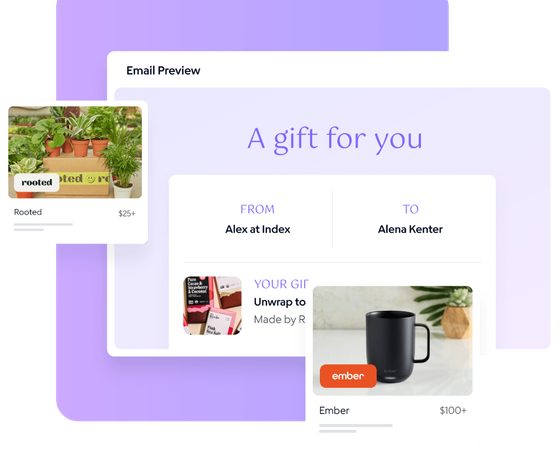
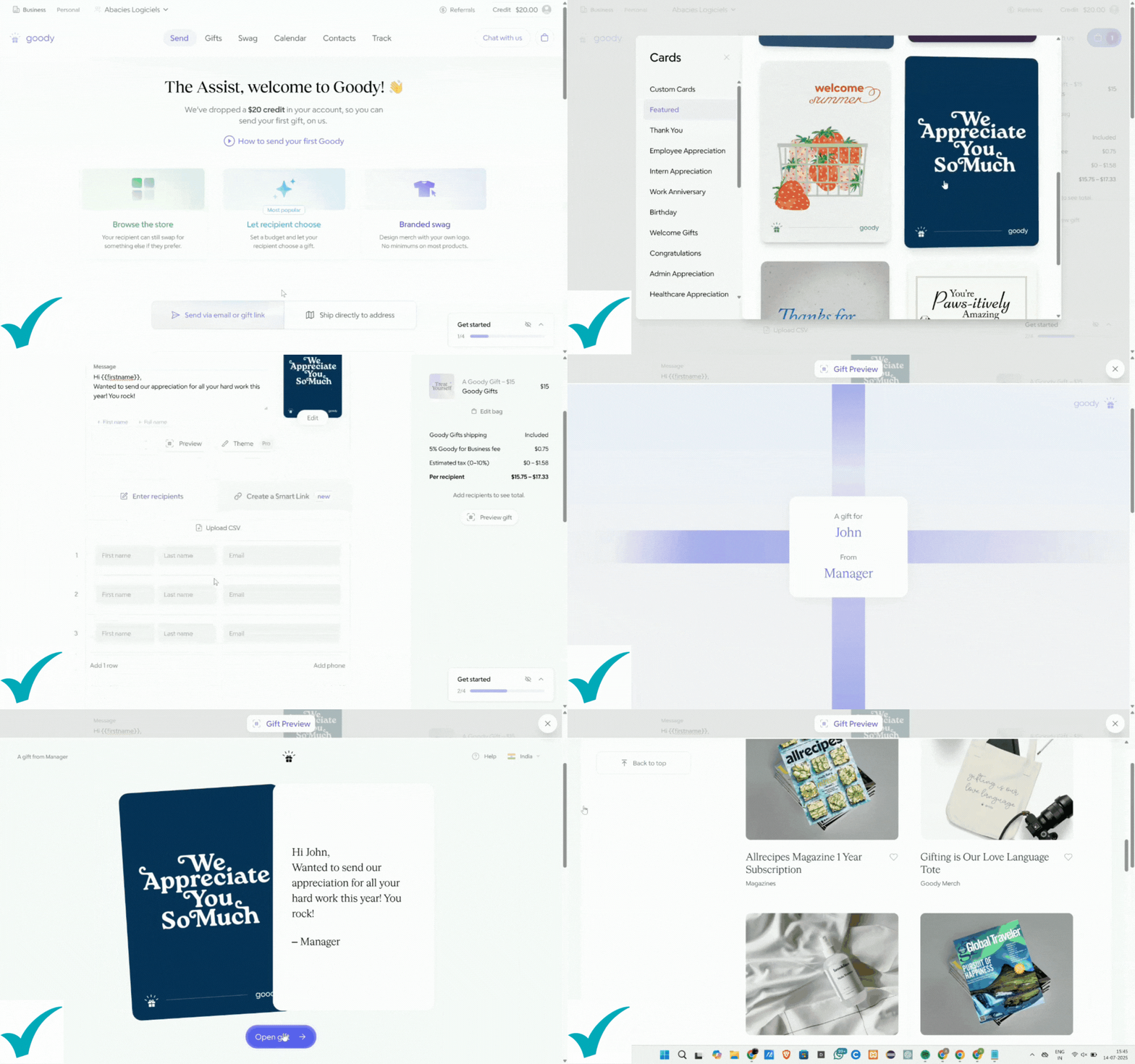
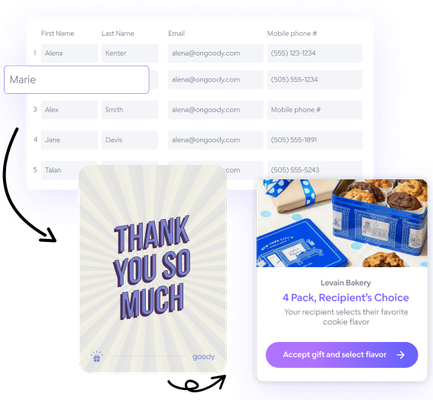
Here’s how it works: you pick from a curated catalog of gifts, enter someone’s email, write a quick note, and Goody does the rest. The recipient gets to either accept the gift or swap it for something else of equal value.

Overview of Goody - At A Glance

Goody is an online corporate gifting platform that specialized in high-quality corporate gifts and custom swag that improve the employee experience and engage directly with employees, clients, customers, and marketing opportunities.

4.8

Pricing

Starter: $0 Forever

Pro: $20 /month/user

Team: Custom pricing for HR, Sales, & Marketing teams

Use Cases

Client Appreciation

Sales Prospecting

Branded Swag

Employee Recognition

Gallery

That last part? Huge. It eliminates the awkwardness of gifting, while making sure the recipient loves the gift they chose.

What really sets Goody apart, though, are the details. The interface is clean, the process is fast, and the whole experience feels like it was built by people who’ve been on the sending end of a “Thanks for all your hard work!” mug disaster. It's gifting with taste—and without the time suck.

Written by:

Connor Garrett

Reviewed by:

Joanna Ericta

Last Updated:

Bookmark this page because it will be your best friend as you navigate the first week of your Goody journey.

Our content is funded in part by commercial partnerships, at no extra cost to you and without impact to our editorial impartiality.

How It Works: Sending a Gift

Double-click to edit this text

Key Features

1. Recipient Choice

This was the feature I didn’t have a ton of experience with. It’s also the one I won’t shut up about.

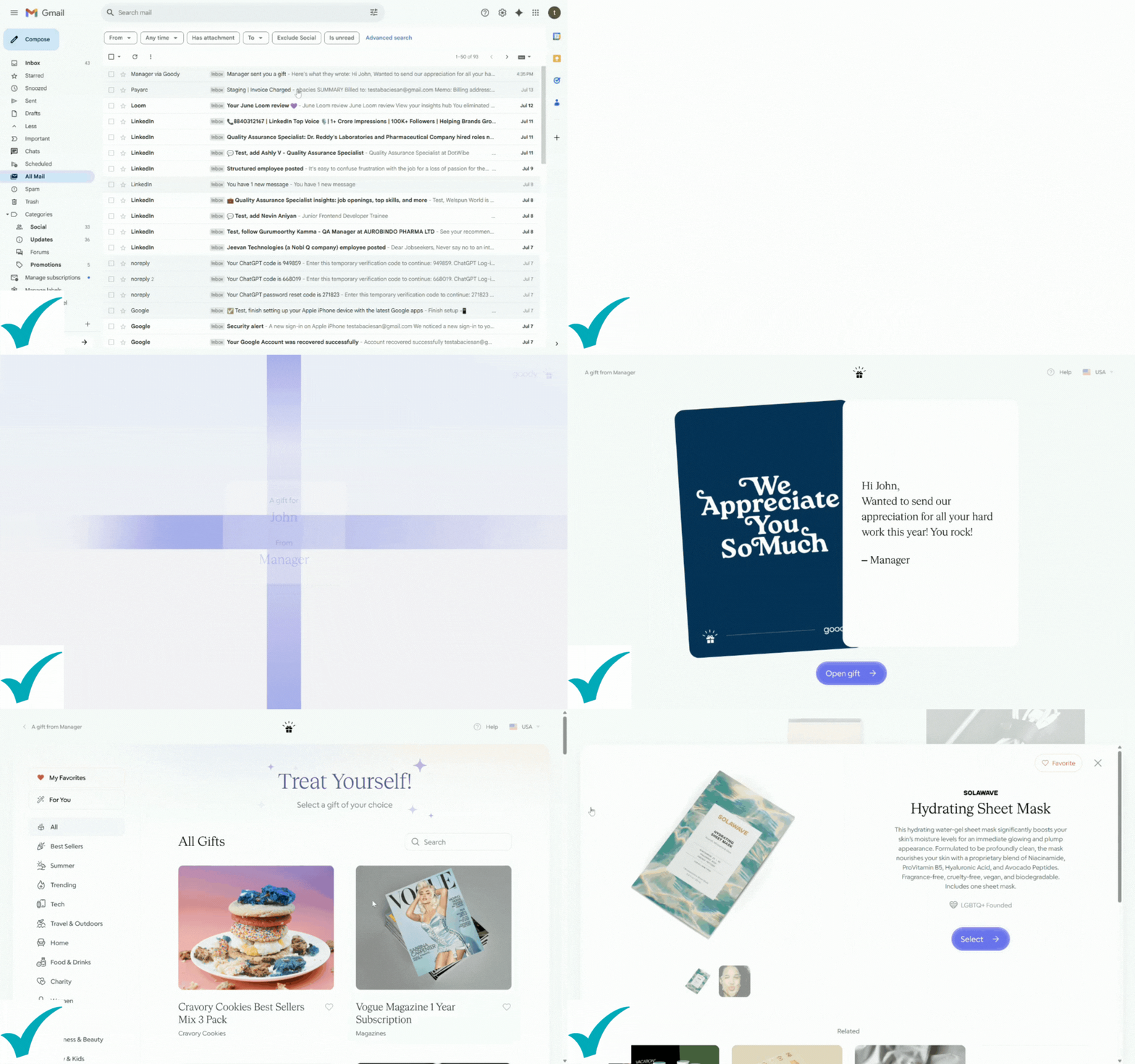
I tested this by sending myself a gourmet snack box (treat yourself, right?) and when the email landed, I was taken to a sleek, branded page with a very tempting “swap” button. Naturally, I clicked it—and boom, I got a bunch of options that were just as nice. Now, you no longer have to be a mind reader.

No more sending someone a cheese board only to find out they’re lactose intolerant. (Sorry, Taylor from Ops.)

2. Automated Gifting

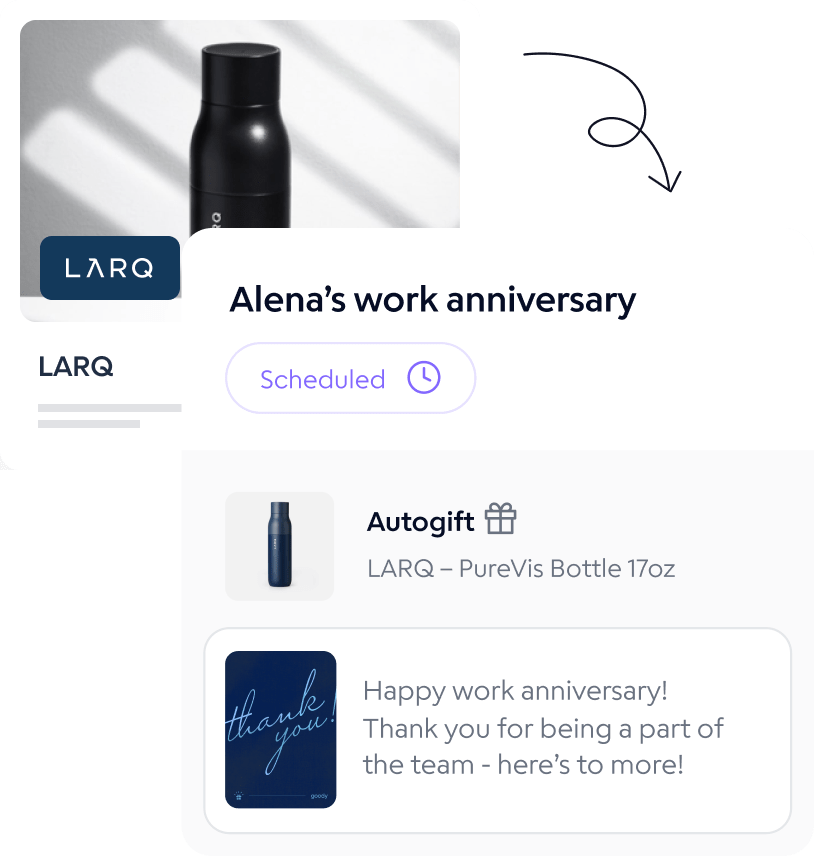
If you’re like me, you love celebrating your people but also regularly forget what day it is. With Goody’s automation feature, you can set up recurring gifting for birthdays, work anniversaries, holidays—you name it.

I connected a dummy calendar and built a test rule: “Send a $25 birthday gift with a personalized message.” It took five minutes, tops. Bonus: you can review gifts before they’re sent out, so you’re never flying blind.

3. Custom Swag

Corporate swag is usually, quite frankly, awful. But Goody actually made me rethink that.

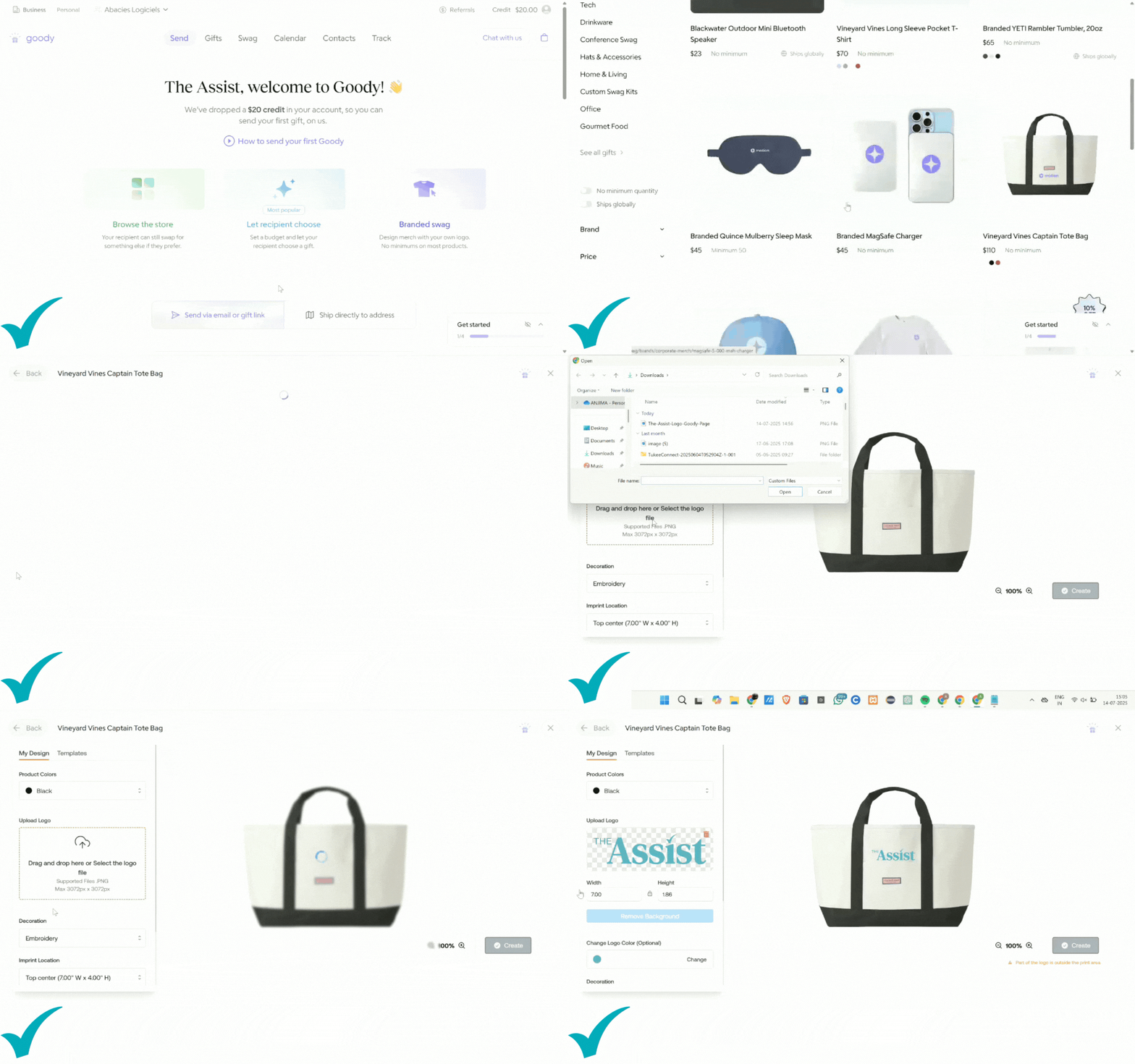
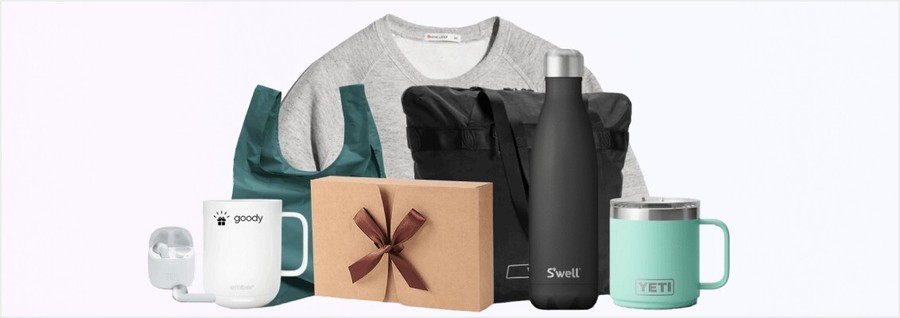
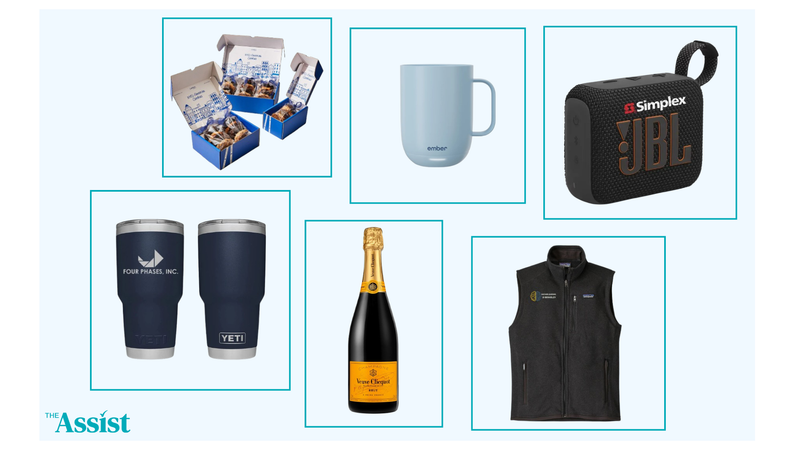
Their branded merch options are sleek: think YETI mugs, Patagonia jackets, minimalist backpacks, and premium snack boxes. I didn’t complete a full order, but I walked through the swag portal, and it felt…dare I say, professional? You upload your logo, preview your items, approve proofs, and order in bulk when you're ready.

Pro-Tip: Upload your custom image or company logo to visualize what the product will look like.

👉

4. Gifting by Email

This is my favorite low-effort, high-impact feature.

All you need is an email. That’s it. Goody sends an email. The recipient clicks, claims, and enters their shipping info privately. It’s elegant, secure, and saves you from spreadsheet nightmares. If you’re gifting prospects, this removes the biggest barrier (and weirdest small talk) in the entire process.

5. Bulk Gifting

I used Goody’s bulk gifting tool with a test list of 10 recipients and not once did I yell at my screen. That’s saying something.

Upload a CSV with names and emails, assign budgets or gift tiers if needed, and you’re off. You can give everyone the same gift or let them choose from a curated collection (which I recommend because it makes it more personal without adding more work). Campaign tracking and tagging help you keep it all organized, especially around the holidays or during employee appreciation weeks.

It’s shockingly painless. Like, “Why wasn’t this invented sooner?” painless.

What do you need help with? 

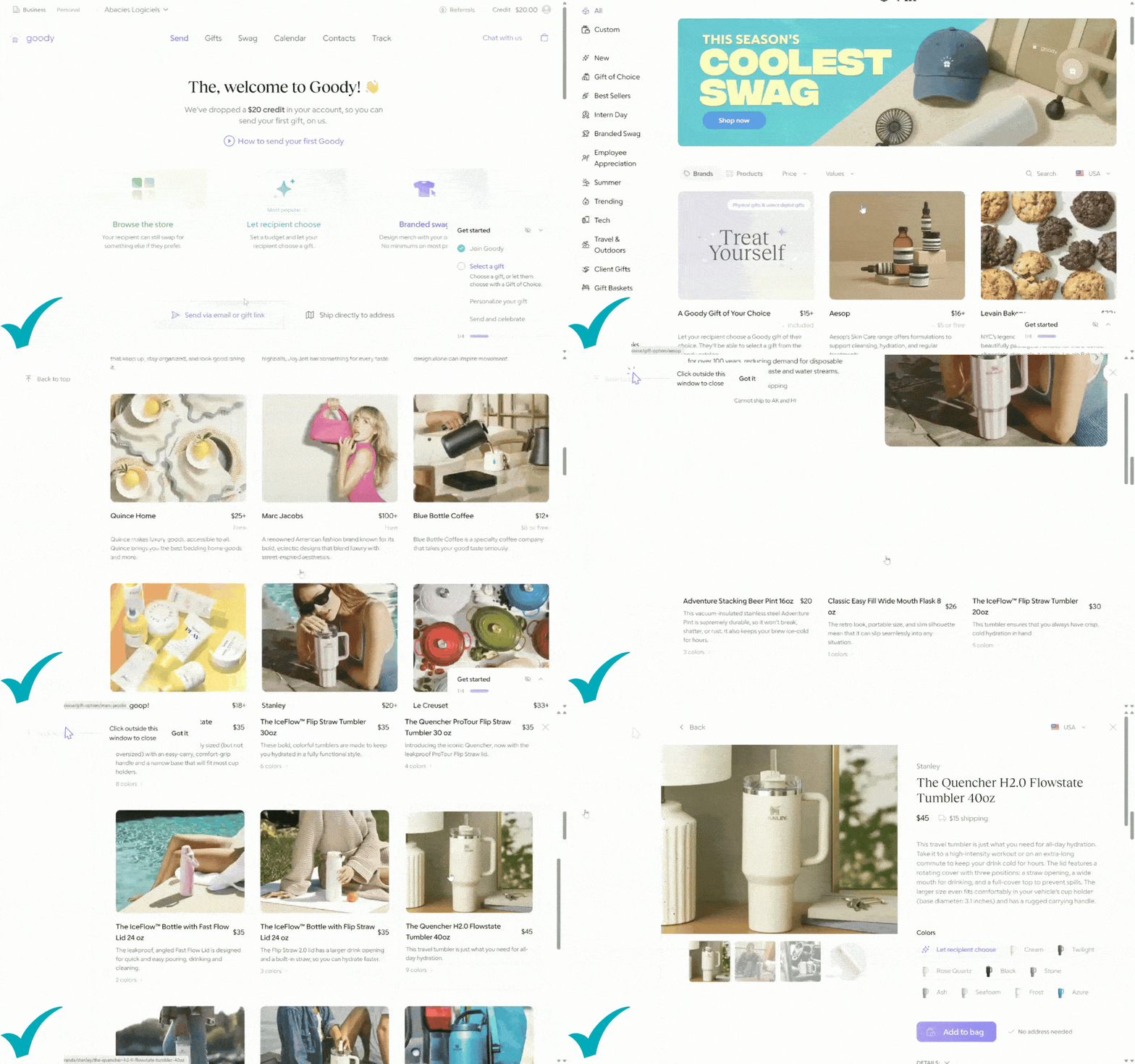
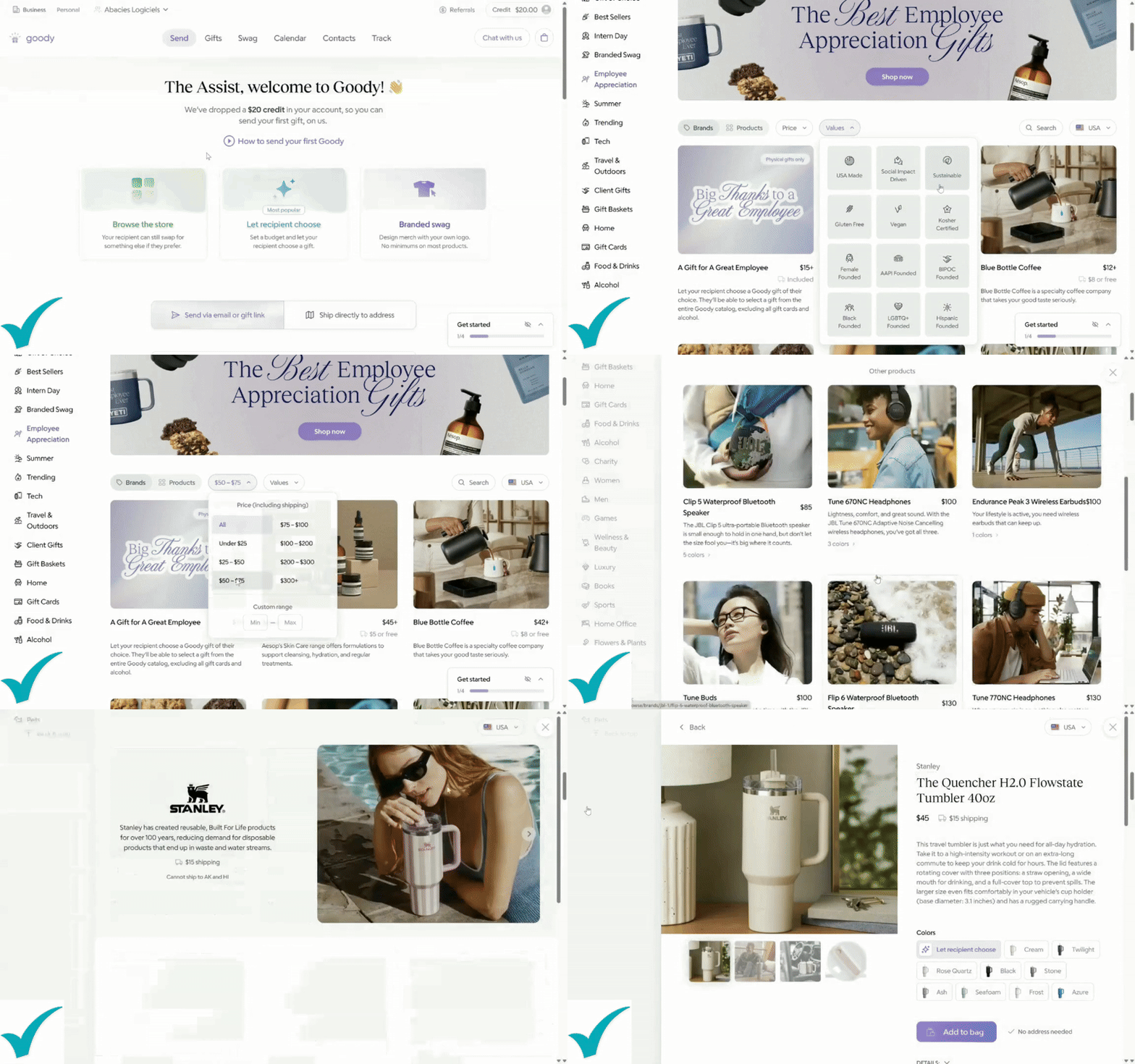
Next up: picking the gift. You can browse by Food, Wellness, Home, Swag—or use the search bar if you already have something in mind. The selection? Surprisingly solid.

The platform emails them a link where they can accept the gift—or swap it for something else of equal value. I mentioned this part of the process for a second time because I love the fact that they get to choose their own gift.

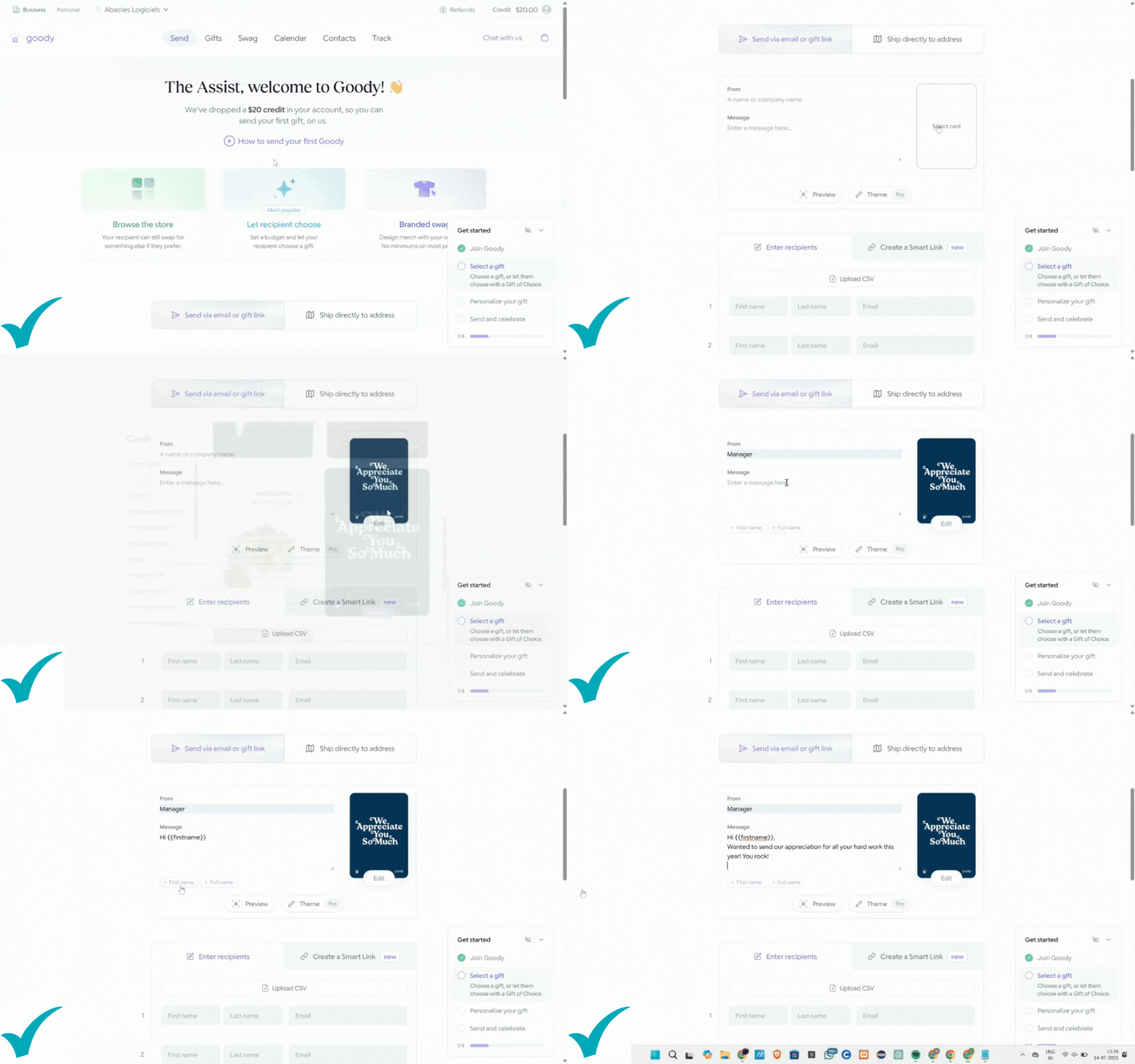
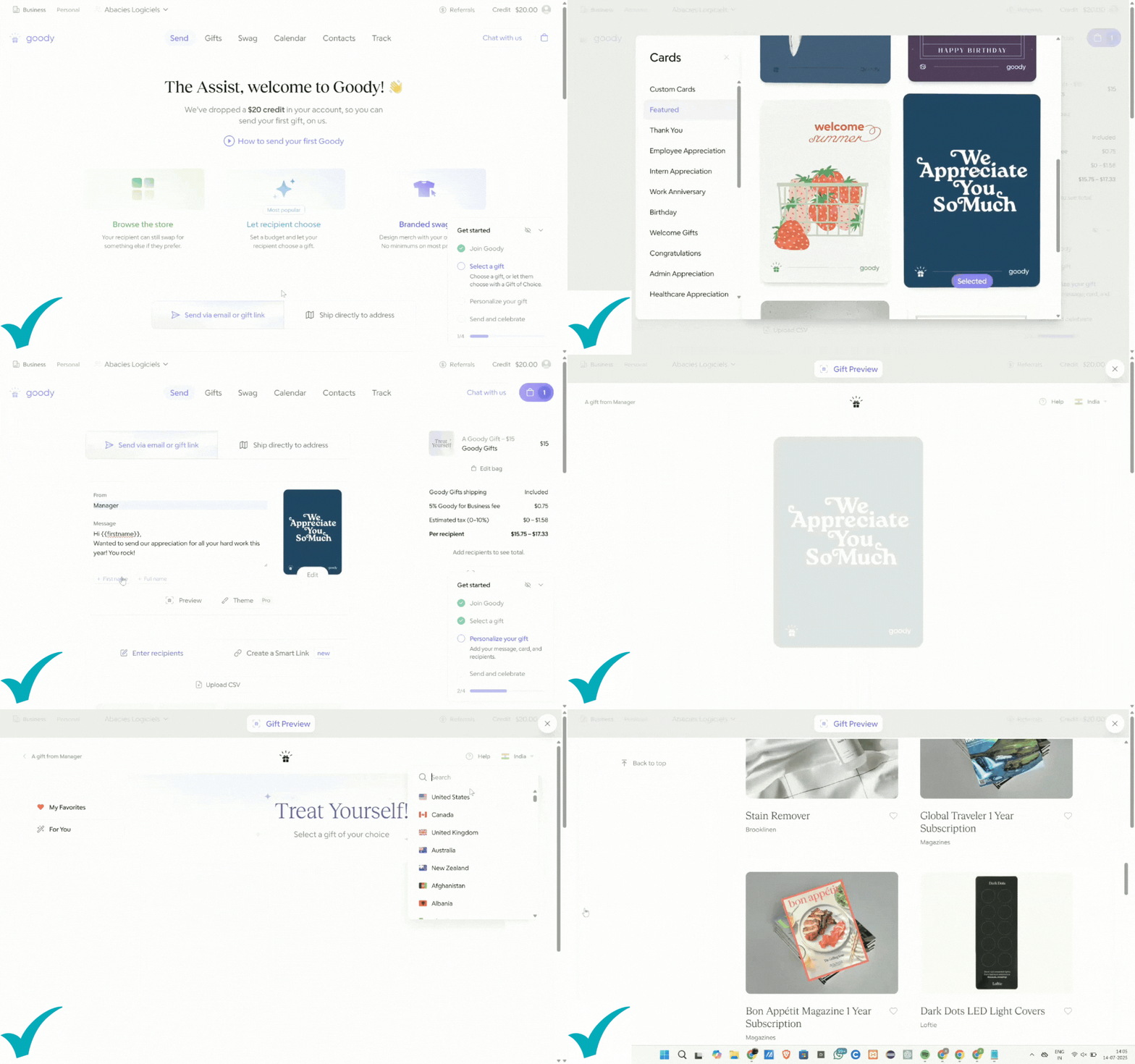
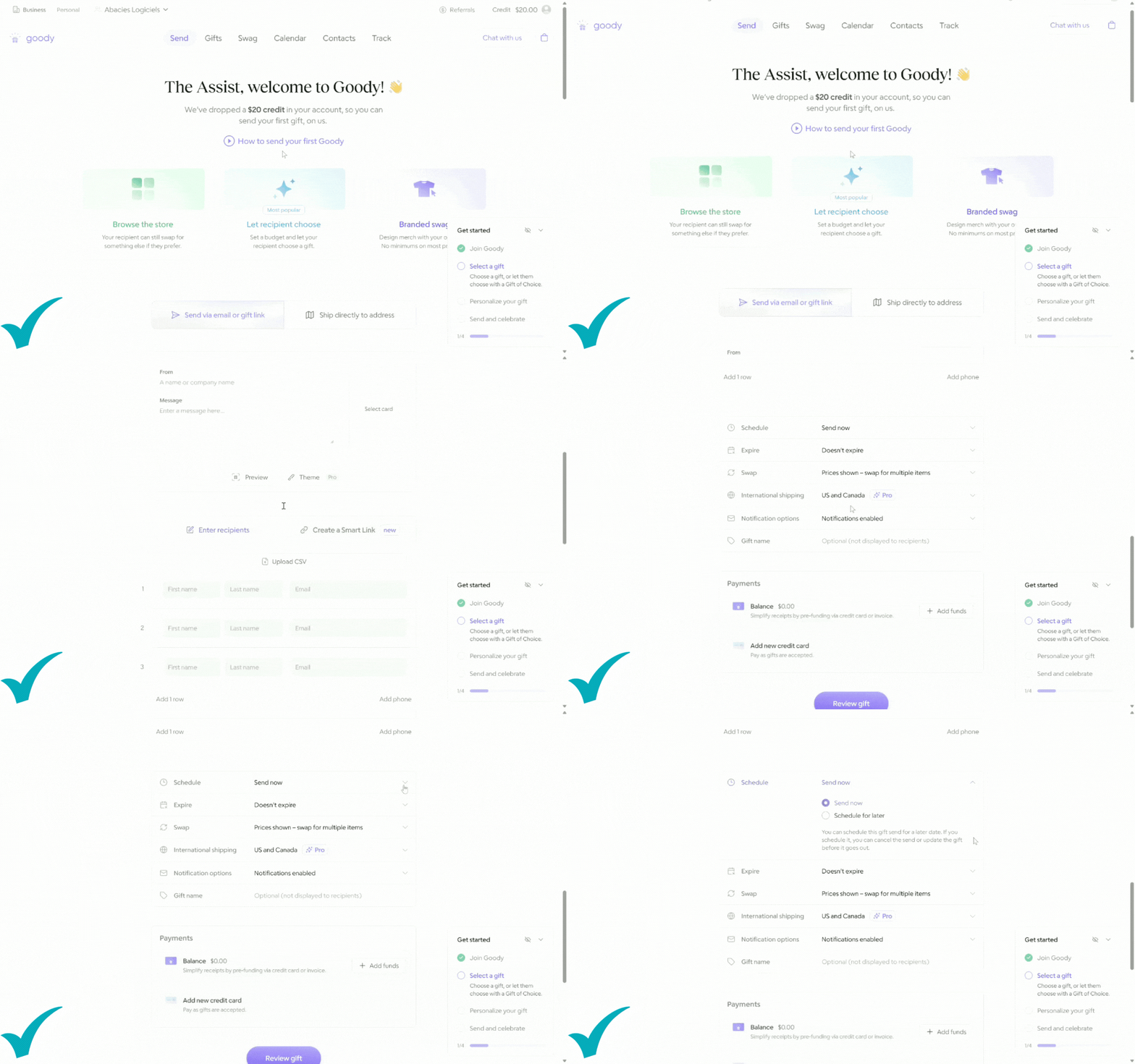
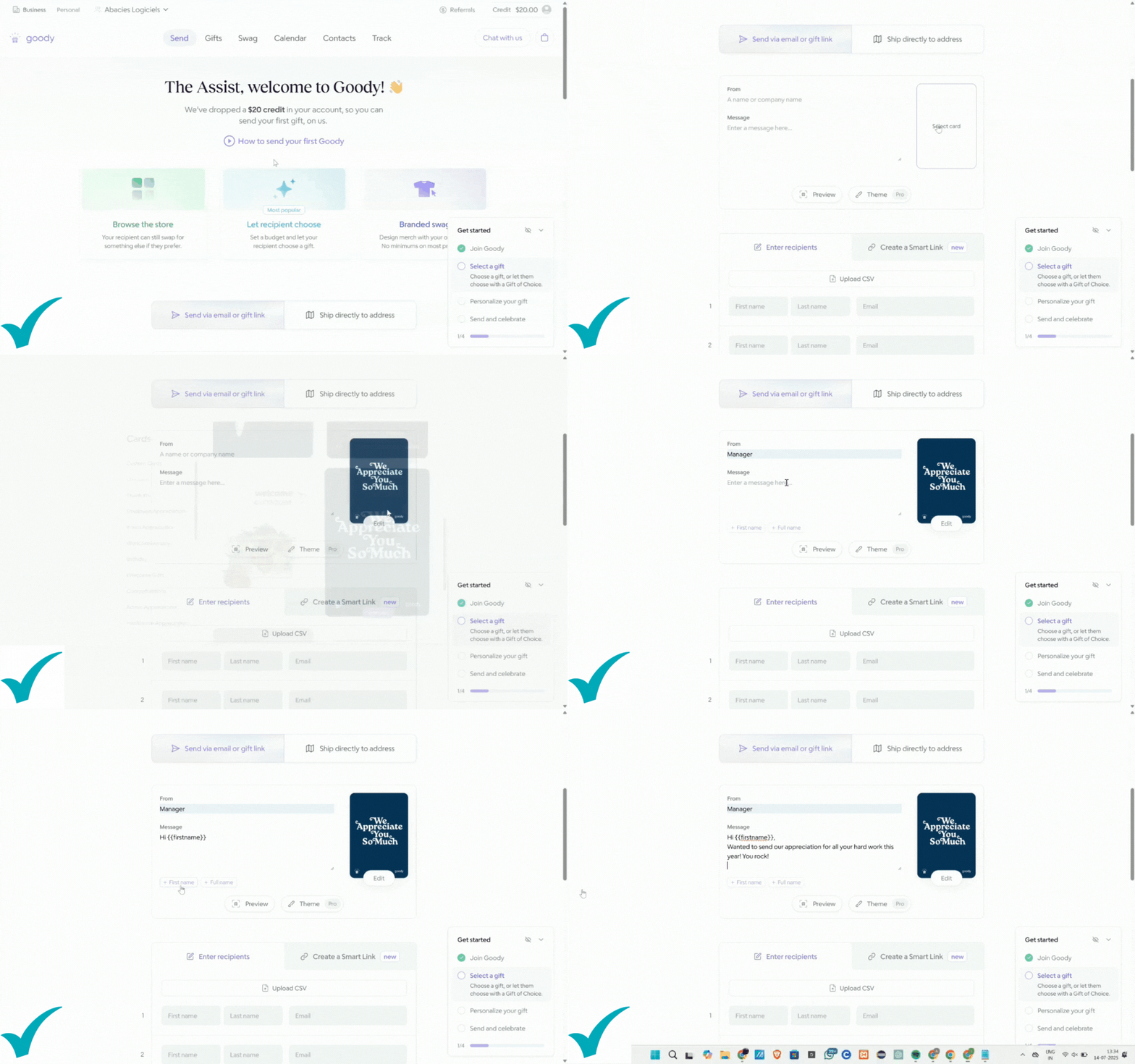
Now for the fun part. Let’s walk through the actual gifting flow because this is where Goody excels.

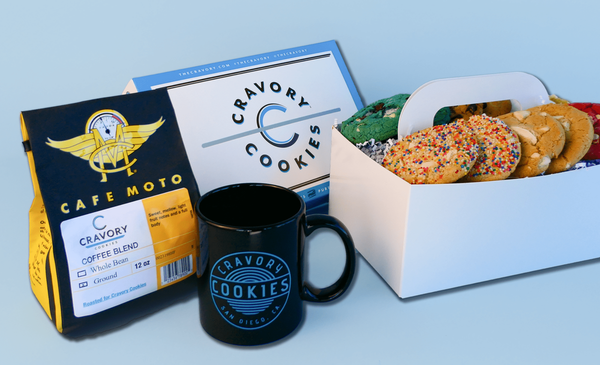
I perused the Goody catalog for a few minutes and chose this coffee and cookie bundle and hit send.

Once the gift is out in the wild, Goody gives you a tidy little tracking view. You can see when it’s opened, claimed, delivered—and even set nudges if someone doesn’t open it. Perfect if you’re sending gifts to clients or prospects who may have flooded inboxes.

When I claimed my own gift, I landed on a polished Goody-branded page with my logo and message front and center. It felt intentional. Like something a company with its act together would send—not a last-minute “oops we forgot” attempt to cover up poor planning.

Bottom line: it works. It looks good. And it saves you from the usual gift-sending chaos. Ten out of ten, would send again.

Getting Started with Goody

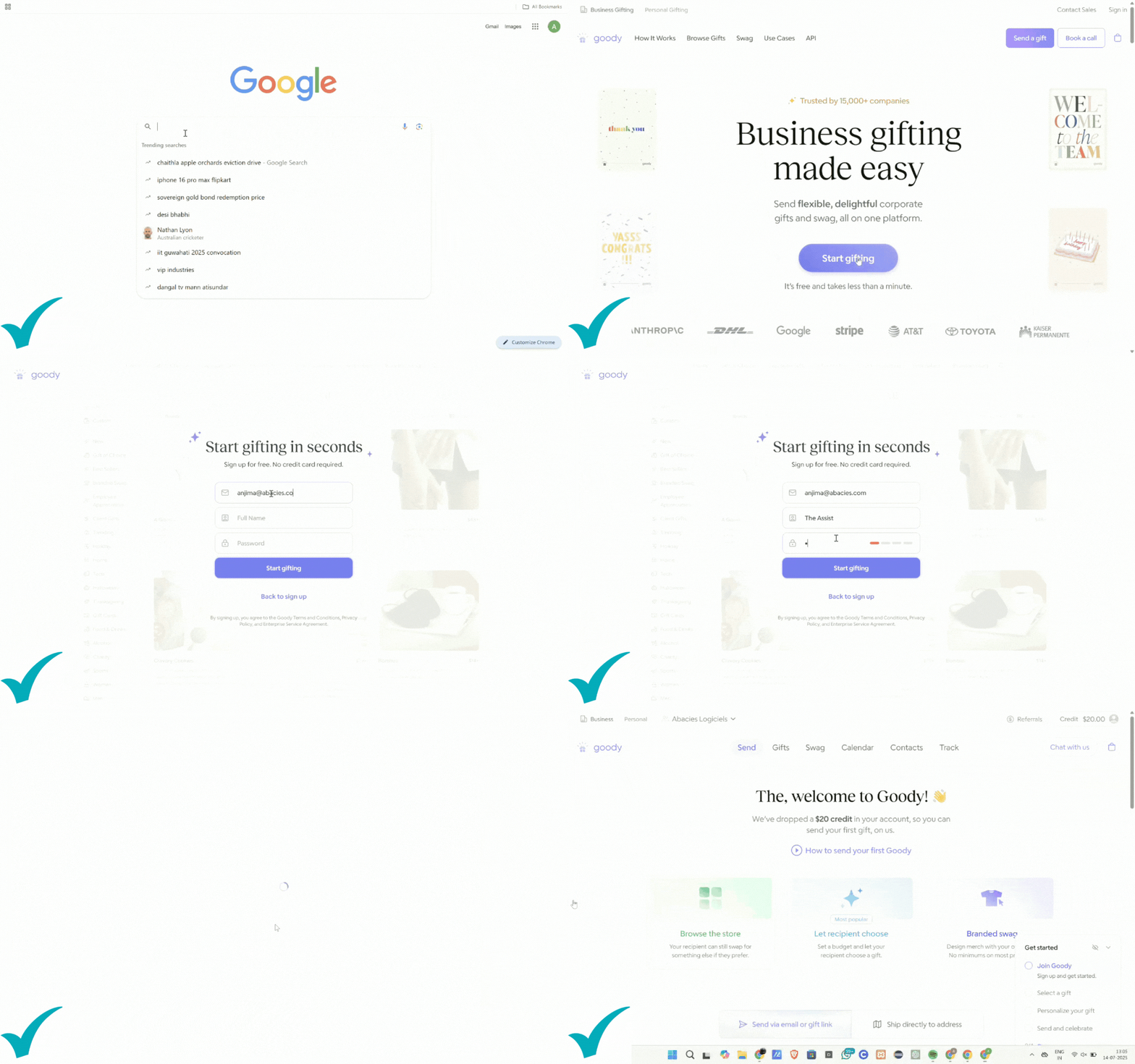
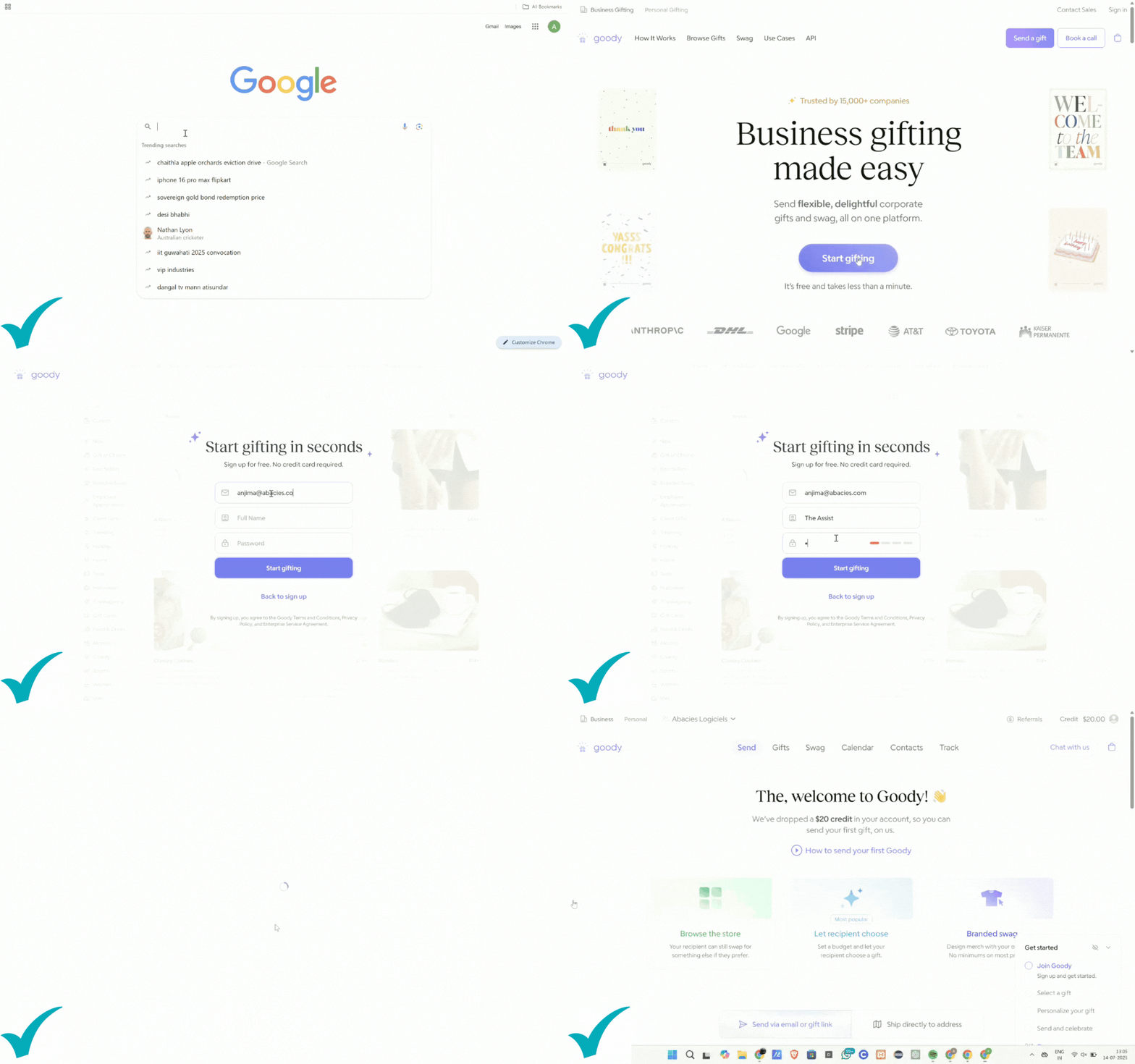
Signing up for Goody was refreshingly uneventful. In the best way. I used my work email, hit “create account,” and seconds later I was in.

No credit card required. No mandatory demo. No 27-part onboarding checklist with a chirpy “let’s get started!” video I’d immediately skip. I simply clicked around a clean, modern interface and a simple question: want to send a gift or build your team?

Honestly, that alone earned some points with me. Too many platforms make you jump through hoops just to look around. With Goody, I could explore the dashboard freely without feeling like I was accidentally signing a lease.

Once I confirmed my email, I landed on the main dashboard—super straightforward and divided into four key actions:

Send a Gift

View Gifts Sent

Build My Team

Manage Contacts

The “Send a Gift” option is front and center, which made it easy to start playing around. Naturally, I clicked through everything else too—Billing, Settings, Integrations—and the vibe was consistent. The features just make sense.

If you’re setting this up for your company, I definitely recommend heading into Team Settings. That’s where you can:

You can also upload your company logo, which gets applied to recipient gift pages and emails. It’s a tiny thing, but trust me—those branding details matter when you’re trying to make things feel personal and polished without having to design a custom landing page from scratch.

Overall, the setup process felt like it was built for busy people who don't want to waste a full afternoon figuring out how to send a candle. It passed my “Is this going to annoy me?” test with flying colors.

Add team members

Set spending permissions

Connect calendars (huge if you want to automate birthdays or work anniversaries)

Brands They Work With

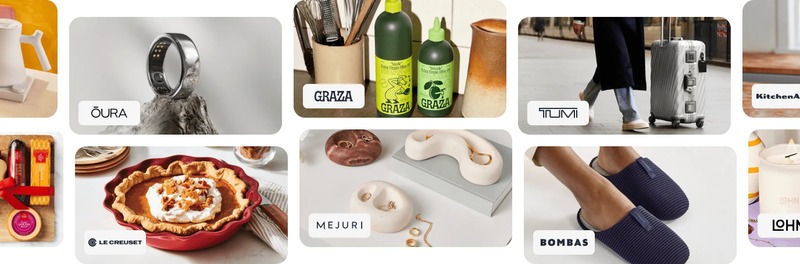
The Goody gifting catalog is full of brands. Some are definitely recognizable and others are smaller brands that Goody works with through partnerships.

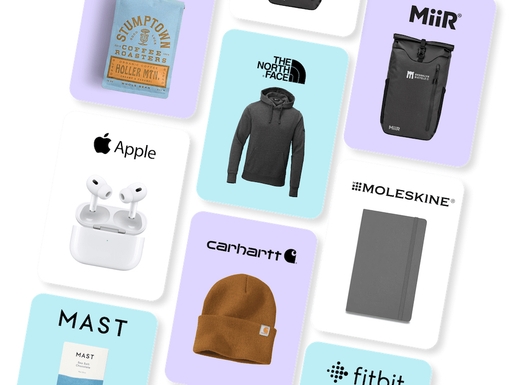
Goody has partnered with an impressive lineup of brands that people have heard of and truly like. We’re talking Levain Bakery, Sweetgreen, Uncommon Goods, Brooklinen, S’well, Jeni’s Ice Cream, Milk Bar, Patagonia, Ember, and more.

Even the smaller boutique brands feel curated with intention. Whether you’re sending a luxe coffee kit or a minimalist tumbler, it all feels modern, premium, and most importantly, like something you wouldn’t re-gift.

Double-click to edit this text

Top Products

We clicked through a lot of Goody’s gift options—partly for research, partly because we were genuinely intrigued—and here are the ones that kept jumping out:

Levain Bakery 4-Pack Cookies: The gold standard of “just because” gifts. Soft, iconic, and gone in seconds.

Ember Smart Mug: High-end, hyper-practical. It screams “I’m thriving in Q4.”

JBL Go4 Wireless Bluetooth Speaker: Portable, easy to connect to in seconds, and plays music with a clean, crisp sound.

Branded YETI Tumbler: Luxe and surprisingly emotional. People feel seen when they get these.

Sweetgreen Gift Card: For the wellness-minded or salad-obsessed. Simple, elevated.

Veuve Clicquot Champagne: A classy gift for a special occasion. With Goody, clients can swap it for non-alcoholic options if they prefer.

Branded Patagonia Vest: If you’re aiming to impress. Feels like a thank-you and a flex.

Desk Plant Set: Aesthetic, low-maintenance, and very much remote-work-core.

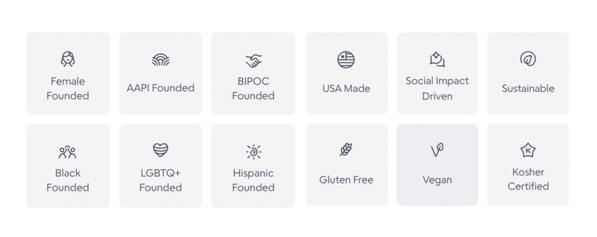
Pro-Tip: You can filter by select values for specific holidays or occasions. Some of these categories that Goody highlights include Sustainable, Female Founded, BIPOC Founded, USA Made, Gluten Free, and more.

👉

Double-click to edit this text

Pricing Breakdown

Goody keeps it simple: it’s free to sign up, and you only pay for the gifts you send. If you want advanced features—like automation, branding, or swag management—there are tiered plans. But the basics? Totally usable without a credit card.

Set your gift budget, and you’re good to go.

Starter

$0 Forever

For individuals gifting occasionally

Send unlimited gifts in the U.S. and Canada.

Pro

$20 /month/user

For individuals gifting at scale

Gift globally, add digital branding, and send gift cards.

Team

Book a demo to chat with the Goody team for custom pricing

For HR, Sales & Marketing teams

Book meetings, accelerate deals, and automate employee gifts.

👉 Sign Up for Goody

Pros and Cons

Pros

Super intuitive UX that takes only a few minutes to get familiar with

Recipient choice = no awkward gifting misfires

Great brand and product selection

No address wrangling

Automation that actually saves time

Support is fast and helpful (yes, I tested them)

The best part? You can filter by vibe, category, or price so curating a collection doesn’t become a two-hour project.

Goody Pricing Breakdown

Cons

Branded swag takes lead time—plan ahead

Some recipients might ghost the gift email (not Goody’s fault, but still)

Full branding features are part of a paid plan

Decision fatigue—Do I want the Bluetooth speakers or the sourdough starter?

Best For

People ops teams, sales leaders, marketers, and busy founders who want to scale appreciation without hiring a full-time “Gifting Operations Manager.”

User Review

“Recently, I received a Goody gift for my birthday. I am always on the move, so the ability to switch the gift (amazing!), and also ship to a location that I am in was superb. I am someone that is both cost and environmentally conscious, so getting what I really want and need in the moment was fantastic.”

Hannah Hicks

Goody Review: Final Assessment

It hits that magical middle ground between ease and thoughtfulness. The features that matter (recipient choice, no-address delivery, automation) are silky smooth. You can tell this wasn’t built by someone guessing what gifting should look like. It was built by someone who’s done it, gotten overwhelmed, and decided to make something better.

It’s not flawless. But it’s a solid platform—and it genuinely makes people feel appreciated without turning gifting into a chore.

After putting Goody through the wringer, from setup to sending to automation, I can confidently say it’s worth a try. The Assist would give it a 4.8 / 5 if we had to put a give a specific rating. 

If you care about employee recognition, client loyalty, or making your brand look like it has its act together, Goody's an easy yes.

©The Assist

Double-click to edit this text

Goody Use Cases

Once I got comfortable poking around Goody’s features, I wanted to see how it held up when mapped to real workflows. Because it’s one thing for a platform to look good in a sandbox, and another to support the nitty-gritty realities HR, sales, or marketing teams are faced with on a daily basis.

So I put on my Ops hat and ran through a few real-world scenarios, from employee appreciation to client gifting to swag campaigns. Here’s how it held up.

Employees: Birthdays, Milestones & Just-Because Moments

If there’s one thing I’ve learned building The Assist, it’s that employee appreciation has officially moved out of the “nice-to-have” column. Recognition—especially when it’s timely and personal—has a real impact on morale, retention, and how your team talks about your culture when you’re not in the Zoom room.

“For my piece, we're a global engineering and consulting firm and have been using monday for 3+ years. We've matured significantly, both as a firm and in our use of it since then. Our standard projects each get a Board, more complex scope projects have multiple Boards rolling into an overall Dashboard. Each of our regions also has its own Dashboard with a Timeline, Workload, and Graph widget to track upcoming deliverables, team utilization, and tasks by category and type. 200+ Boards, 150+ users, and over $35M in project revenue being tracked.” — ACatNamedSimon via r/mondaydotcom

Goody makes this feel effortless.

I started by setting up an automated birthday gifting flow—a test run with a few fake names and dates. I uploaded a simple CSV (name, email, birthday), then created a rule: “Send a $30 birthday gift with a note from the team.” Scheduled it for 9 a.m. on the big day. The dashboard showed me exactly what each person would receive, note included, and gave me the option to manually approve gifts if I wanted to keep a little human oversight.

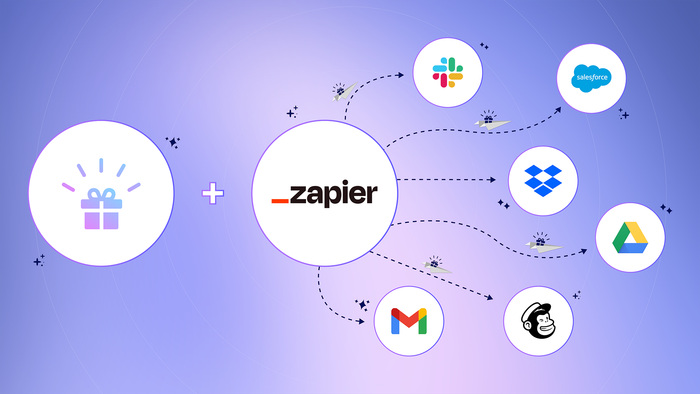
Beyond birthdays, you can do the same for work anniversaries, welcome gifts, or even “you crushed it” moments. Goody integrates with tools like Zapier and Google Calendar (and soon, more HR platforms), so once you set it up, it’s basically a little culture-building machine running in the background.

One feature I unexpectedly loved? Collections. Think of these like mini gift catalogs you can curate by theme or budget. I built a “Work From Anywhere” collection with cozy throws, portable coffee kits, and wireless chargers. Then, I used it as a test run for Employee Appreciation Week.

Instead of everyone getting the same hoodie (that half of them already own), each person picked something they really wanted.

Little details like being able to swap a gift, or seeing your company’s logo on the digital gift page, make the whole thing feel personal without feeling cheesy. It’s thoughtful and scalable, which is a combo I rarely get to say with a straight face.

If there’s one heads-up I’d give: if you’re planning custom swag kits or branded onboarding boxes, build in a little lead time. Custom stuff is great, but it’s not instant. That said, once it’s in motion, Goody makes repeat gifting ridiculously smooth.

Clients: The Art of the “Just Right” Gift

We’ve all been there—trying to thank a prospect without sounding desperate. Or sending a holiday gift that accidentally comes off like a sales pitch wrapped in foil. Client gifting is a delicate dance. It has to feel generous, not transactional. Polished, not perfunctory.

“For my piece, we're a global engineering and consulting firm and have been using monday for 3+ years. We've matured significantly, both as a firm and in our use of it since then. Our standard projects each get a Board, more complex scope projects have multiple Boards rolling into an overall Dashboard. Each of our regions also has its own Dashboard with a Timeline, Workload, and Graph widget to track upcoming deliverables, team utilization, and tasks by category and type. 200+ Boards, 150+ users, and over $35M in project revenue being tracked.” — ACatNamedSimon via r/mondaydotcom

And honestly? Goody gets it.

One of my favorite things about the platform is how you can send a gift without ever asking for someone’s shipping address. That little detail? Vital.

Especially for sales prospecting or following up after a demo when it’s still early in the relationship and you’re trying not to cross into “Hi, I’m outside your house with a mug” territory.

I tested this by creating a prospecting flow: added their name and work email, selected a coffee + pastry set, dropped in a short message, and scheduled it to send the next morning. The email they received was clean, branded, and respectful of their time. They could either accept it or swap it out for something else.

One of our team members even uses it after onboarding calls to keep the relationship warm without adding pressure.

You can also track campaign performance, which I love. Curious if someone claimed their gift and then booked a meeting? Goody logs all of that. It’s subtle sales enablement in a bow.

Also worth noting: the gifts themselves don’t feel bulky or weird. Since recipients choose what they want and enter their own details, you sidestep any misfires (no wine to non-drinkers, no dairy bombs to vegans).

This setup lowers friction across the board. It works great for:

Thank-yous post-demo

Signed contract moments

Client onboarding follow-ups

Just-because “we appreciate you” touches

User Review

“When a client signs up with us, or they onboard with us, we send them a gift. We’ll use the gift to say, ‘I’m your Client Success Manager.’ We send gifts throughout the client journey. Nine times out of ten, we hear back from the customer – how much they appreciate the thoughtfulness."

Laith Masarweh

CEO & Founder at Assistantly

And if you’re feeling extra, you can set up multi-touch campaigns—think: welcome gift to signed deal to 3-month check-in with a treat.

It’s gifting that feels modern, respectful, and effective.

Marketing Swag + Giveaways: Where Things Got Spicy

First, you can create branded swag digitally. You upload your logo, approve proofs, and everything is stored digitally so you don’t have to stack boxes in your hallway or chase a FedEx truck.

“For my piece, we're a global engineering and consulting firm and have been using monday for 3+ years. We've matured significantly, both as a firm and in our use of it since then. Our standard projects each get a Board, more complex scope projects have multiple Boards rolling into an overall Dashboard. Each of our regions also has its own Dashboard with a Timeline, Workload, and Graph widget to track upcoming deliverables, team utilization, and tasks by category and type. 200+ Boards, 150+ users, and over $35M in project revenue being tracked.” — ACatNamedSimon via r/mondaydotcom

When it’s time to do a giveaway or follow-up from a trade show, it’s plug-and-play. Upload a list of emails, assign a collection or specific gift, and Goody handles the rest.

I tested this with a mock campaign: “Thanks for stopping by our booth. Grab something fun on us.” Each recipient got a link to a curated selection of gifts, branded and unbranded. And there was zero post-event cleanup on my end.

One feature I didn’t expect to love? Swag kits for special guests. You can build a branded experience with your own merch, a few luxe extras (candles, snacks, maybe a handwritten note), and have it delivered without lifting a finger.

The Goody team put together a Summer-themed “Goody bag” that looks pretty sweet to us! Seems like a good option for a corporate event, Company spirit week, or a holiday gift bag!

Webinar giveaways (like a $100 gift card to one lucky attendee)

Post-panel gifts for podcast guests or speakers

Social media contest fulfillment

Holiday sweepstakes

User Review

“I’ve handled a lot of event swag and giveaway campaigns in my past life at ZipRecruiter running marketing events, and I can confidently say most of them were logistical nightmares. Coordinating inventory, dealing with shipping delays, getting 3XL shirts when you asked for notebooks. It’s disarray disguised in a branded tee." 

Joanna Ericta

Founder of The Assist

👉

Pro-Tip: For swag-related purchases at Goody, make sure to ask your contact about inventory. Goody will house all the inventory for you so you don’t have to guess sizes, order 500 stress balls, or figure out where to store it all. Goody is basically your on-demand swag closet, minus the warehouse and supply chain stress.

You can also use Goody for:

Now for the fun part. Let’s walk through the actual gifting flow because this is where Goody excels.

Double-click to edit this text

About our links

Some of the links on our site are affiliate links, meaning if you click, sign up, or make a purchase through them – or if you use our tools to receive personalized quotes – we might receive a commission from the product or service provider. This allows us to offer you in-depth reviews and valuable content at no extra cost.

Double-click to edit this text

Goody Resources

Getting the most out of Goody is simple when you have the right links handy.

1. Goody Support: The Support Center is your go‑to spot for searchable articles, clear how‑tos, and live chat when you want a human.

2. Gift API: If you’re ready to embed gifting in your own product or workflow, the Gift API lets you send gifts programmatically, track delivery, and pull status updates straight from your code.

3. YouTube Channel: More of a visual learner? Follow the Goody YouTube channel for bite‑size walkthroughs, feature tips, and real‑world examples.

Bookmark the Goody Support Center for quick reference during setup and beyond.

👉

When you click “Send a Gift,” it asks who you’re sending it to. You can upload a whole CSV if you’re going big, or just drop in one name and email like I did for my test run (yes, I sent myself a gift—don’t judge).

Goody Report Card

Brought to you by

Category
Gifting Experience for Senders
Gifting Experience for Recipients
Gift Selection
Custom Swag
Bulk Gifting
Support & Setup
Price
Overall rating
“The BIG question” - The Assist’s 411
Does it make sending gifts better and easier?

4.8 / 5

review
Will employees enjoy receiving their gift from Goody?

4.7 / 5

review
Is there a wide variety of high-quality gift options to choose from?

4.9 / 5

review
Can you order swag with Goody?

4.7 / 5

review
Does Goody scale well?

4.6 / 5

review
How helpful is Goody when you need assistance?

4.7 / 5

review
Is it worth the money?

4.6 / 5

review
What is our final rating of Goody?

4.8 / 5

review
👉 Get started with Goody